
作为一名摄影爱好者,经过多年的器材使用和升级经历,我想分享一些关于摄影器材选择的心得体会。
相机选购指南h2
选择相机要根据自己的需求和预算,不要盲目追求高端器材。
入门级别推荐h3
-
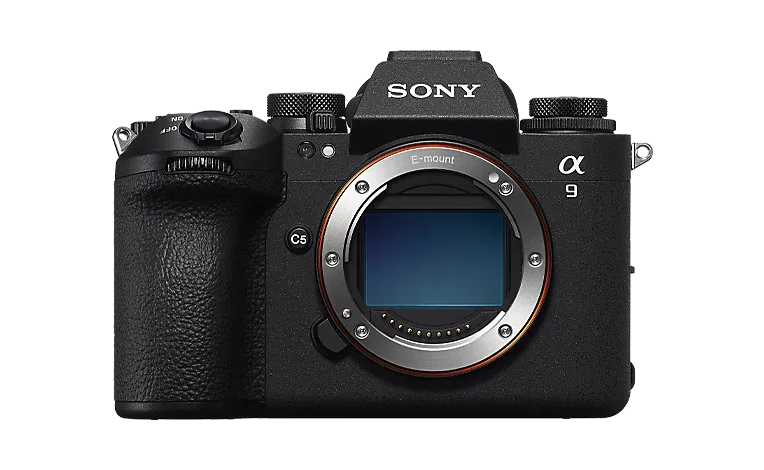
无反相机
- Sony A7C
- Canon EOS R10
- Nikon Z5
-
单反相机
- Canon 90D
- Nikon D7500
镜头系统h2
镜头的重要性往往超过机身,应该优先投资镜头。
常用焦段h3
1. 广角:16-35mm2. 标准:24-70mm3. 远摄:70-200mm辅助设备h2
合适的辅助设备能极大提升拍摄体验。
必备配件清单
- 三脚架
- 碳纤维材质
- 球形云台
- 滤镜
- UV滤镜
- ND减光镜
- 偏振镜
- 闪光灯
- 摄影包
预算分配h2
合理分配预算很重要,以下是建议的配置方案。
入门套装(2万预算)h3
- 机身:Sony A7C(12000)
- 镜头:
- 腾龙 28-75mm f/2.8(5000)
- 配件:
- 三脚架(2000)
- 滤镜组(1000)
进阶套装(5万预算)h3
使用技巧h2
器材只是工具,技术才是关键。
基础技巧h3
- 曝光三要素
- 光圈
- 快门
- ISO
- 构图法则
- 三分法
- 对称构图
- 引导线
器材保养h2
日常维护要点
- 清洁
- 镜头清洁
- 感光元件清洁
- 存储
- 防潮箱使用
- 电池保养
- 携带
- 防震保护
- 防水考虑
购买渠道h2
选择可靠的购买渠道很重要。
- 实体店
- 大型相机卖场
- 品牌专卖店
- 网络渠道
- 官方旗舰店
- 信誉良好的经销商
升级建议h2
最后,给大家一些升级建议:
- 循序渐进
- 重点投资镜头
- 根据拍摄需求选择
- 不要盲目追求新品
希望这篇指南能帮助你在摄影器材的选择上少走弯路,找到最适合自己的摄影装备。
src/pages/index.astro- readme page.src/config.ts- readme page config.src/components/base- most of the components come from here.
Site Configh3
Configure basic site information:
export const SITE: Site = { title: 'Litos', description: 'Litos is a blog theme built with Astro.js and Dnzzk2.', website: 'https://stackpilot-blog.pages.dev/', lang: 'en', base: '/', author: 'Dnzzk2', ogImage: '/og-image.jpg',}| Property | Description |
|---|---|
| title | The title of the site. |
| description | The description of the site. |
| website | Your final, deployed URL. Astro uses this full URL to generate your sitemap and canonical URLs in your final build. It is strongly recommended that you set this configuration to get the most out of Astro. |
| lang | The lang global attribute helps define the language of an element. |
| base | The base path to deploy to. Astro will use this path as the root for your pages and assets both in development and in production build. When you set it to /docs, astro dev will start your server at /docs. |
| author | The author of the site. |
| ogImage | The Open Graph images of the site, but on the specific post page, you can use other ogImage instead. |
Header Linksh3
Top jump link component configuration:
export const HEADER_LINKS: Link[] = [ { name: 'Posts', url: '/posts', },]Footer Linksh3
Footer link component configuration:
export const FOOTER_LINKS: Link[] = [ { name: 'Readme', url: '/', },]Social Linksh3
In the readme page, you can see a string of icons below the theme introduction, which can be configured below. Icons are from Iconify.
export const SOCIAL_LINKS: SocialLink[] = [ { name: 'github', url: 'https://github.com/yourname', icon: 'icon-[ri--github-fill]', count: 11, }, { name: 'twitter', url: 'https://x.com/yourname', icon: 'icon-[ri--twitter-x-fill]', },]| Property | Description |
|---|---|
| name | The name of the social link. |
| url | The URL of the social link. |
| icon | The icon of the social link. |
| count | The number of followers of this social media link. This is an optional field. |
Spotlighth3
export const GITHUB_CONFIG: GithubConfig = { ENABLED: true, GITHUB_USERNAME: 'Dnzzk2', TOOLTIP_ENABLED: true,}| Property | Description |
|---|---|
| ENABLED | Whether to enable GitHub features. |
| GITHUB_USERNAME | The GitHub username to fetch data. |
| TOOLTIP_ENABLED | Whether to enable Github Tooltip (the cursor hover card) features. |
Skillsh3
On the readme page, you can see a skill display area where you can showcase your skills by configuring the following code:
export const SKILLSSHOWCASE_CONFIG: SkillsShowcaseConfig = { SKILLS_ENABLED: true, SKILLS_DATA: [ { direction: 'left', skills: [ { name: 'JavaScript', icon: 'icon-[mdi--language-javascript]', }, { name: 'CSS', icon: 'icon-[mdi--language-css3]', }, { name: 'HTML', icon: 'icon-[mdi--language-html5]', }, { name: 'TypeScript', icon: 'icon-[mdi--language-typescript]', }, ], }, ],}| Property | Description |
|---|---|
| SKILLS_ENABLED | Whether to enable SkillsShowcase features. |
| SKILLS_DATA | The data of the skills. A single object represents a row. |
| direction | Each animation runs in two directions: left and right. |
| skills | The skills array. |
| name | The name of the skill. |
| icon | The icon of the skill. Icons are from Iconify. |
It is recommended to run the project locally and check its effectiveness. It is suggested to have at least three different skills per line.
Postsh3
Here, we mainly display pinned posts. If there are no pinned posts, we will display the latest number of size posts based on POSTS_CONFIG.